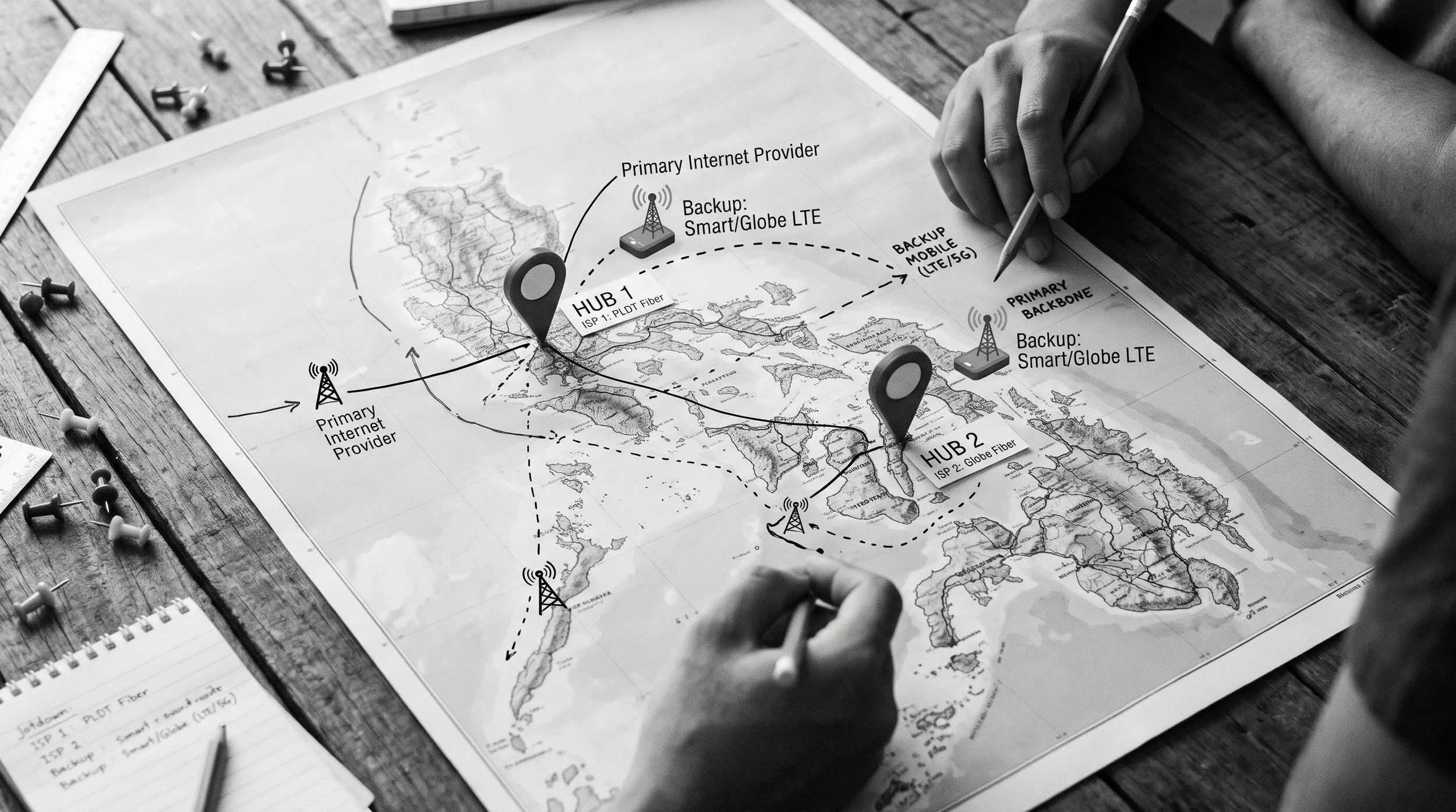
Ookla's analysis of Speedtest data from the second quarter of 2025 to the second quarter of 2026, reported by BusinessWorld in September 2026, put the median fixed download speed in Metro Manila at 118.15 Mbps and in Cebu at 112.33 Mbps. The same report found Metro Manila's median mobile download speed was 75.57 Mbps, ranking 11th among 13 Southeast Asian destinations, and that 78.2 percent of its 5G samples met Ookla's threshold of 25 Mbps down and 3 Mbps up. Both cities are well connected for ticket work. Meanwhile, PAGASA's annual report on the 2020 typhoon season found that tropical cyclone wind signals were hoisted most often, eight times, over Metro Manila and several nearby areas, and that nearly all of that year's landfalling cyclones tracked over Luzon and Samar Island.
Put those facts together and a pattern appears that matters for any MSP with Filipino staff: the best-connected places are not exempt from weather, and the less-connected places are not necessarily safer. Where your technicians live is a risk decision, not just a detail of hiring. This post covers how connectivity differs by location, how storm exposure shifts from year to year, what happens to power and communications during major storms, and how to spread a team across locations so that a single event does not remove a whole shift. It does not compare talent pools or pay by region, because I did not find a reliable source for either.
One Time Zone, Different Risk Profiles
The Philippines uses a single time zone, UTC+8, with no daylight saving time. A technician in Cebu, Davao, or Metro Manila works the same clock, so the overlap with Australian business hours and the US overnight window is identical wherever they live. Location therefore does not change your scheduling. It changes the infrastructure under each technician: the internet providers available, how reliable the power is, and how exposed the area is to storms in a given season.
That is useful in one way. You can choose location for resilience without paying a time zone penalty. The same is true of the people you already have: if your coverage depends on two technicians in the same neighborhood on the same internet provider, you have one point of failure that looks like two people.
Connectivity: Fast Enough Almost Everywhere That Matters, With Gaps
MSP work needs little bandwidth. A technician working in your PSA, RMM, and chat tools does not need the fastest connection, so headline speeds matter less than consistency. Still, the data shows how uneven the country is. According to BusinessWorld's report on Ookla's analysis of remote-work destinations, Ookla judged Metro Manila's connectivity sufficient for remote work even though it ranked low among its regional peers for mobile speed and 5G consistency.
The regional picture comes from an earlier BusinessWorld report on Ookla data for the second quarter of 2024, which found the five fastest areas for fixed broadband were all in Luzon, with CALABARZON highest at 99.55 Mbps and Eastern Visayas lowest at 38.43 Mbps. Ookla attributed the concentration to Luzon's economic significance and population density, where most high-speed broadband investment has gone, especially Metro Manila and nearby provinces and Central Luzon. The same report put Starlink's median download speed in the Philippines at 48.14 Mbps against 94.42 Mbps for fixed broadband. That is slower than fiber, and still more than ticket work requires, which makes satellite a candidate for a backup connection where fixed lines are weak.
| Location or connection | Median download (Ookla) | Period and note |
|---|---|---|
| Metro Manila, fixed broadband | 118.15 Mbps | Q2 2025 to Q2 2026, as reported in September 2026 |
| Cebu, fixed broadband | 112.33 Mbps | Q2 2025 to Q2 2026, as reported in September 2026 |
| Metro Manila, mobile | 75.57 Mbps | Ranked 11th of 13 Southeast Asian destinations, with 78.2% of 5G samples above Ookla's threshold |
| CALABARZON, fixed broadband | 99.55 Mbps | Q2 2024, the fastest region at that time |
| Eastern Visayas, fixed broadband | 38.43 Mbps | Q2 2024, the slowest region at that time |
| Starlink, national median | 48.14 Mbps | Q2 2024, compared with 94.42 Mbps for fixed broadband nationally |
The figures come from different periods and different reports, so compare them as a rough guide to the gap between regions and not as current values for any street. Check what a specific candidate or provider can actually get, and ask for a speed and latency test from the technician's real location before assigning sole-coverage shifts.
Two practical conclusions follow. First, a mobile hotspot is a usable backup in a city like Metro Manila, but mobile performance is less consistent than fixed lines, so choose a carrier different from the home fiber provider and test it at the technician's address. Second, for a technician outside the major hubs, confirm that fixed broadband is available and reliable before relying on that person for critical coverage.
Storms: The Exposure Changes From Year to Year
PAGASA's annual report on the 2020 season records 22 tropical cyclones in the Philippine Area of Responsibility and 11 landfalls, with nearly all of them tracking over Luzon and Samar Island. Wind signals were hoisted in all provincial or sub-provincial localities except Basilan, Sulu, Tawi-Tawi, the southern part of Zamboanga Peninsula, Palawan, and most of SOCCSKSARGEN, and most frequently over places including Metro Manila, which had eight instances. The highest signal in Mindanao that year was Signal No. 1, and the highest in the Visayas, outside Eastern Visayas, was Signal No. 2.
The pattern does not repeat each year. PAGASA's 2021 report found wind signals most frequently hoisted over Caraga, Eastern Visayas, Extreme Northern Luzon, and most of Central and Western Visayas. So the region that was lightly affected one year can be the most affected the next, which means no location is a reliable shelter. A sensible plan assumes any of your technicians' locations could be under a wind signal in a given season, and arranges coverage so that no one location holds a whole shift.
PAGASA also gives lead time. Its report says it issues track and intensity forecasts out to 120 hours, and its wind signal system warns land areas up to 36 hours before the onset of strong winds, with shorter lead times for higher signals. That gives you a window of a few days to move work forward and confirm who is available, which the continuity checklist in Konnect's earlier post on typhoons, power cuts, and internet outages covers in detail.
Power and Communications Under Storm Conditions
PAGASA's description of the wind signal levels shows what storm strength means for infrastructure. For the system as used in 2020, the report describes Wind Signal No. 3 as bringing the possibility of widespread disruption of electrical power and communication services, and Signal No. 5 as severely disrupting power distribution and communications. The signal system was updated in March 2022, so check the current table, but the principle holds: strong storms disrupt exactly the two things a remote technician depends on.
The practical protection is the same set of measures a good home-office setup already has. Use a laptop rather than a desktop so that a battery carries the workday, put the modem and router on a small UPS, keep a charged power bank for a phone hotspot, and have a mobile connection on a second carrier. For roles that carry sole coverage, arrange a fallback location, such as a coworking space or office with backup power, in a different part of town from the technician's home. None of this prevents an outage, and all of it reduces how long an outage costs you.
Spreading the Team
Three principles do most of the work. First, keep technicians who cover the same shift in different places, on different internet providers, so one weather event or one provider fault does not take both. Second, avoid putting every technician in the same city, even a well-connected one, because a storm that hits Metro Manila hard would then affect your entire offshore operation. Two hubs in different regions, such as Metro Manila and Cebu, which both show strong fixed broadband in the Ookla data, give you geographic separation without a connectivity penalty, though you should check each candidate's actual connection. Third, keep an onshore fallback that can take escalations and the queue if the offshore side goes dark, with documentation good enough for someone else to pick up. Konnect's guide to maintaining service quality across time zones covers the framework for that handoff.
Where your coverage depends on a single technician on a given shift, location matters even more, since there is no overlap to absorb a failure. Either add a second person in a different place or accept that the shift has a gap and plan the escalation for it. Konnect's piece on how MSPs build offshore NOC teams in the Philippines for 24/7 monitoring discusses how monitoring roles are structured for continuous coverage.
| Question for a provider | Why it matters | What a good answer includes |
|---|---|---|
| Where are your technicians based, and how many are in any one city? | A single event can affect everyone in the same area | A spread across at least two regions, with no shift fully concentrated in one place |
| Which internet providers do staff use, and is there a second connection? | A provider fault takes out everyone on that provider | Different providers across the team, and a mobile or satellite backup on a different network |
| What power and equipment arrangements exist? | Storms disrupt power and communications | Laptops, UPS for network gear, power banks, and a fallback location for sole-coverage roles |
| What is the plan when a storm is forecast? | PAGASA gives days of notice that can be used | A written sequence for confirming availability, moving work, and reassigning coverage |
| Who decides on work suspension and how are staff paid? | Labor rules affect availability on storm days | A clear policy that matches current Department of Labor and Employment guidance |
Home Offices and Hubs
Most remote technicians work from home, and some providers also offer a shared office or coworking arrangement. Each has trade-offs. A home setup gives you a distributed team with no single building to lose, but each technician's power and internet are their own. An office hub concentrates equipment and backup power in one place, which makes it easier to protect, but it also concentrates people in one location and requires them to travel to it, which is hard to do during a storm. A mixed model, with home-based staff plus a fallback space for key roles, is a common compromise. Ask any provider, including us, how they handle it, and what happens on a storm day.
Where This Does Not Fit
Location planning has limits. If you have a single offshore technician, there is nothing to spread, and the question becomes what your onshore fallback is. If your provider controls hiring and location, you can ask for a spread but may not get precise choices, so make it part of the conversation before you sign. If a client contract restricts where staff may work, those terms override any resilience preference. The sources used here are also limited: the Ookla figures describe speeds and not outage frequency, and the PAGASA reports describe wind signals and not outages at any particular address. Treat them as inputs to a decision and verify the details for the specific people involved.
A Thirty-Day Review
In the first week, list every offshore technician by city, internet provider, and shift, and mark where any shift depends on people in the same place or on the same provider. In the second week, ask each technician to test their fixed and backup connections and report the results, and confirm that each has a battery plan for the router and laptop. In the third week, write a short storm checklist covering who confirms availability, how work moves, and who covers if someone goes offline. In the fourth week, fix the gaps you found, such as adding a second person on a sole-coverage shift or a backup carrier for a technician with only one connection. At the end of the month you should be able to say, for any shift, what happens if one location is offline.
📅 Book a 20-minute call: https://meet.brevo.com/konnectph
✉️ Email us: hello@konnect.ph
If you rely on Filipino technicians for overnight or after-hours coverage and want to check how exposed a single weather event or internet outage would leave you, bring your coverage schedule and a list of where your technicians are based to the call, and we will go through how to spread the shifts and set up the backups.
About the Author
Vilbert Fermin is the founder of Konnect, a remote staffing company connecting North American and Australian businesses with top Filipino talent. With deep expertise in IT support and remote team management, Vilbert helps MSPs access skilled technical professionals without the overhead of full-time domestic IT staff. His mission is to showcase Filipino excellence while helping businesses stay protected, productive, and competitive through strategic remote staffing.